Add a Location: Analyze Any Address Instantly
Choosing the right storefront location is one of the biggest factors determining whether a brick-and-mortar business survives. StreetSpring’s Survivability Score allows you to i...
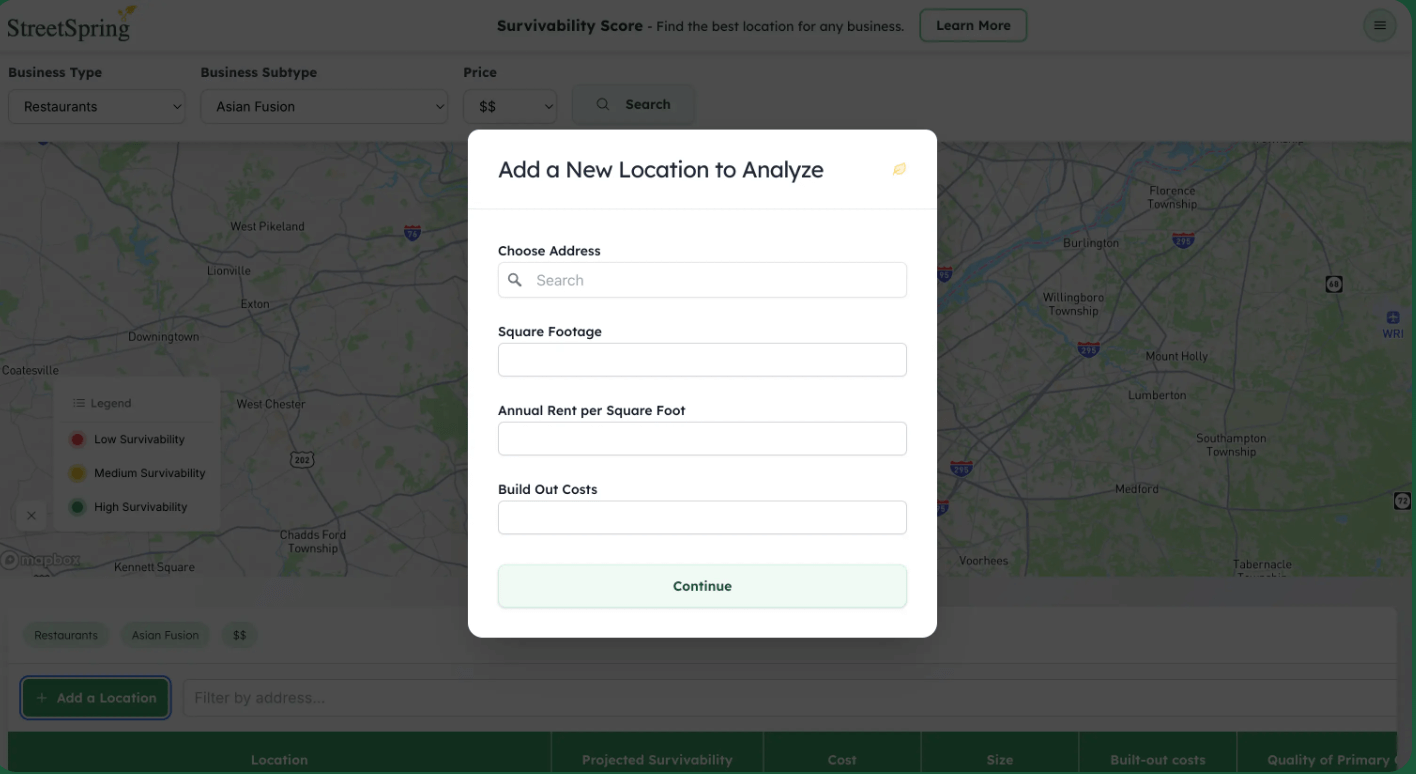
Choosing the right storefront location is one of the biggest factors determining whether a brick-and-mortar business survives. StreetSpring’s Survivability Score allows you to instantly evaluate any address in the U.S. using AI, real-world business outcomes, competition layers, consumer expenditure trends, and 100+ metrics that influence long-term success.
This guide walks you through exactly how to add a location and interpret the results with confidence.
Step 1: Enter the Address

Start by typing the exact storefront address into the Add Location search bar.
StreetSpring locates the parcel, identifies its census block group, pulls tenant-mix indicators, and loads all AI-predicted survivability metrics.
Step 2: View the Survivability Score

The Survivability Score reveals how likely a business is to survive at this exact address based on:
- Competition quality
- Local customer demand
- Rent efficiency
- Business type alignment
- Walkability and transit strength
- Historical outcomes of similar businesses
This helps you avoid risky spaces and focus on locations with a statistically higher chance of long-term success.
Step 3: Analyze Nearby Competition

StreetSpring automatically maps:
- All primary, secondary, and tertiary competitors
- Their quality (ratings, density, impact)
- Their influence on survivability
- How your chosen location compares to alternatives
This gives you clarity on whether the area is oversaturated or full of opportunity.
Step 4: Compare Multiple Locations

Search multiple candidate addresses to compare:
- Predicted survivability
- Consumer expenditure potential
- Rent efficiency for your business type
- Competition alignment
- Overall performance ranking
This makes selecting a location data-driven instead of guesswork.
Step 5: Customize Inputs

Every business has unique financial and operational characteristics. Edit inputs such as:
- Monthly rent
- Square footage
- Business subtype
- Tenant improvement costs
StreetSpring instantly recalculates survivability, showing how assumptions impact the potential success of the location.
FAQs
What is a Survivability Score?
A predictive score that estimates how likely a business is to last at a specific address using AI, competition analysis, walkability and transit access, and 100+ location factors.
Does this work for every U.S. city?
Yes. StreetSpring supports nationwide analysis using standardized datasets and localized business performance patterns.
Can I analyze more than one location?
Yes. You can run unlimited address searches and compare results side-by-side.
Does StreetSpring work for every business type?
The platform supports hundreds of business types: retail, restaurants, fitness, salons, healthcare, wellness, and more.
How accurate are the predictions?
StreetSpring’s model is trained on real business outcomes and historically provides highly strong predictive performance. While no model guarantees success, it significantly reduces risk.
How do I get started?
Try the Survivability Score → and enter any address into the Survivability Score tool.
Related Guides
-
Learn how StreetSpring calculates the success probability of any address with 100+ location variables:
Survivability Score Explained -
Compare StreetSpring against other location-intelligence tools in commercial real estate:
StreetSpring vs. Competitors -
Understand why survival rates haven’t improved, and why choosing the right location matters more than ever:
Why Survival Rates Stay Flat -
See how landlord reps use data to match businesses with better-fitting storefronts:
Guide for Landlord Representatives
How this is measured. Every StreetSpring figure is the projected chance that a business of that type lasts two or more years at a specific address, built from 100+ location factors and 570,000+ observed business outcomes. Full methodology →